OneLocale
OneLocale – Notes for Translators
Thank you for helping make someone’s app feel native!
Save as a new file
- Before starting, save your work as a new file.
- Save as UTF-16 LE with BOM to preserve Unicode.
This is a restriction of all
.inifiles — a.langfile IS a type of.inifile. - Save with the proper language tag
- For example, a French translation of
MyScript-[en].langwould be saved asMyScript-[fr].lang
Language tags
- Basic language tags are found at List of ISO 639-1 Codes (Wikipedia).
- All 436 valid tags are listed in this Microsoft Document (scroll down to Table 2).
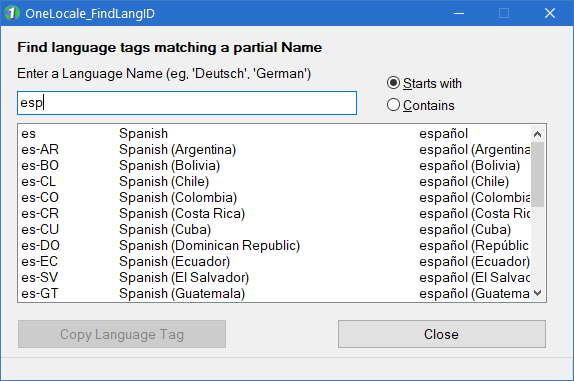
👉 It’s easiest to use OneLocale_FindLangID to find tags by partial language name. As shown below for example, entering “spa…” or “esp…” lists all Spanish dialects:
Important Rules
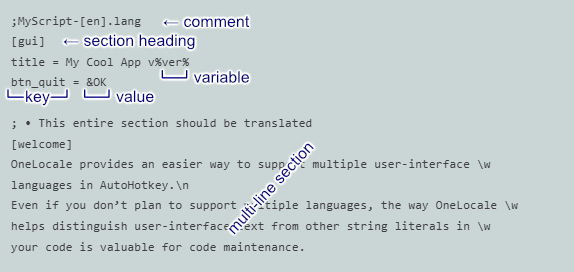
- Never change a key — anything to the left of ‘
=’. - Never change a variable — words inside
%percent signs% - When we talk about a Section we mean a part beginning with a
[section heading]
Parts of a .lang file:
Formatting
- ’
\n’ forces a new line - Anything after ‘
\z’ is a comment and will never appear to the user:- Maybe a comment to you, to give helpful context.
- Maybe a comment from you, to the developer or the next translator.
- To show a literal (not marking a variable) ‘
%’, write ‘\%’.
👉 Watch out for translated strings becoming too long to display properly. Experiment. Run the app and see how it looks. Try to re-word your translation to make it fit in the space available.
As a rule of thumb, messages should be no more than ~120% longer than the base language - although this depends on how much room the developer gave you.
If your shortened translation sacrifices important meaning, you can explain further in the element’s Tooltip, if it has one.
Menus
- Ampersand (‘
&’) sets the Access Key (e.g. ‘&Cancel’)- Choose an appropriate key for your language.
- Make them unique within a menu, if possible.
- To show literal ‘
&’ without the underline, use ‘&&’ (e.g. ‘Cats && Dogs’)
- Tab (
\t) separates menu text and menu Accelerator (hotkey) (e.g. ‘&Save \t Ctrl+S’)- Choose an appropriate hotkey for your language.
- Make them unique within a GUI window (each dialog window can have its own hotkeys)
- Discuss with the developer as needed.
See Microsoft’s Keyboard Shortcuts and Localization for details of both Access Keys and Accelerators.
GUI elements
- Unlike Menus, Gui elements (Buttons, Checkboxes, Labels, etc.) don’t have hotkeys.
- Ampersand (
&) sets the Access Key (e.g. ‘Save &As...’)- Choose the appropriate key for your language.
- Make them unique within a GUI window, if possible.
- To show literal ‘
&’ without the underline, use ‘&&’
Multi-line sections
Multi-line sections look different in a .lang file, because they don’t have ‘=’ on every line like normal sections.
- The entire section should be translated (except
%variables%) - Indent text with ‘
\t’. - Blank lines are ignored on input; use ‘
\n’ if you need an empty line on output. - Remove line breaks (allow word wrap) with
\wat the start or end of line. - Pay attention to display limits. Test often. Discuss problems with the developer.
Error messages
- Assuming the error message is to be shown in a standard Message Box, length isn’t as critical as it is for Gui elements, as a Message Box can grow somewhat.
- Test often. As most error messages are rarely displayed, the developer should probably give you a helper app that can display every error message as it would appear in the final product.
Tooltips
- There are no access keys or accelerators.
- No length restriction — tooltips can grow to display a lot of text.
Questions? Open an issue on the GitHub repo — we’re friendly.
The 2025 way
👉 Just give the entire .lang file to Grok, Claude or ChatGPT and say: Translate this AutoHotkey OneLocale language file to German. Never touch keys or %variables% and attach a copy of these Notes.
A good AI chatbot will give you a near-perfect file in seconds. You only need to skim for tone.
(Yes, this is how most translations will happen from now on.) 😀
– the OneLocale team (and Grok says hi)
Back to README